So you’ve decided to take the plunge into the DJ life, and now you’re looking at a controller that has more buttons than a spaceship cockpit. Chill. That overwhelming feeling is basically a rite of passage. When you’re shopping for a first controller, it’s tempting to obsess over brand names, LED colors, or how many channels you might use someday. But the real move is understanding what all those knobs and faders actually do, because once you know that, the gear starts to feel less like alien tech and more like an instrument you can vibe with.
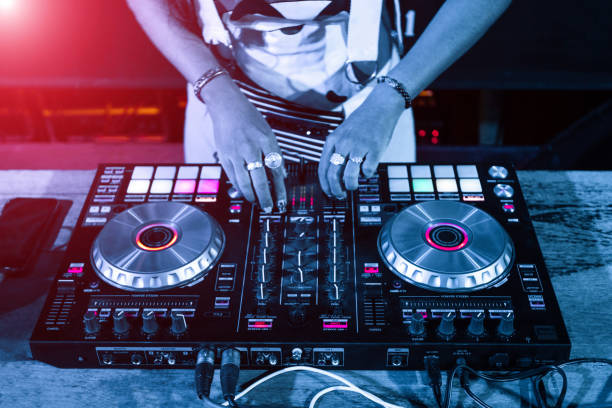
Let’s start with the most obvious physical features: the jog wheels. On the surface, they spin. That’s it. But those two metal or plastic platters are your tactile way to nudge a track forward or pull it back, basically your manual fine-tuning for beatmatching. When you’re just starting out, you don’t need fancy motorized platters that mimic CDJs. A basic jog wheel is fine. Your ears will do way more work than your fingers in the first few months anyway.
Next to the jogs, you’ve got your transport controls: play, pause, and cue. The cue button is your secret weapon because it lets you set a temporary marker in the track, so you can jump back to a specific spot while you’re practicing a mix. You’ll press that cue button a million times before you nail a transition, and that is the whole point. The play button seems self-explanatory, but here’s a trick: always hit play on the downbeat of the new track. That split-second timing is what separates smooth blends from hot messes.
Now, the faders. Every controller has two or more channel faders. These control the volume of each track before it goes to the speakers. Then you have the crossfader, the long horizontal fader at the bottom. It does the same job but for cutting between two channels, like a light switch between Track A and Track B. Beginners sometimes think the crossfader is the only thing that matters for mixing, but honestly, most house and techno DJs barely touch it. The channel faders and EQs do the heavy lifting. So if you see a cheap controller with a scratch-style crossfader, don’t get distracted. What matters more is the EQ section.
Ah, the EQ knobs. These are your tone shapers. Usually you get three per channel: low, mid, and high. The low controls bass, which is where dance music lives. When you’re mixing two tracks, you don’t want both basses thumping at the same time unless you’re going for a messy wall of mud. The classic move is to kill the bass on the incoming track, open it up only when you want to drop the energy, and swap the low ends while you duck out the outgoing track’s high end. That’s a whole essay in itself, but just know that every DJ’s best friend is that little knob down low.
Don’t sleep on the gain or trim knob, usually near the top of each channel. It boosts the incoming signal before it hits the EQ. If one track sounds quieter than another, you use gain to make them level. It’s like adjusting the volume before adjusting the tone. A balanced gain stage makes your ears less fried and your mixes way cleaner. Trust me, your future crowd will thank you.
Performance pads are the colorful little grid under each jog wheel. These can do cue points, effects, samples, even pitch loops. For a beginner, they’re nice to trigger hot cues or fire off a quick loop to extend a breakdown. But the pads are not a substitute for beatmatching. They’re fun toys that help you get creative once you’ve nailed the fundamentals. If you’re choosing between two controllers and one has big pads and one has better build quality, go with the build quality. A first controller should be a little brick that doesn’t feel like it’ll crack when you get excited.
Also check the master output volume and the headphone cue button. That little cue knob or button lets you listen to Track B in your headphones while Track A is playing on the main speakers. That is how you prep your next mix without the whole club hearing your mistakes. Make sure the controller has a dedicated headphone jack and a way to toggle between headphones and preview.
Finally, think about the software. Most beginner controllers come with a free license for something like Serato Lite or Virtual DJ. It doesn’t matter which one you choose right now. The skills don’t lock you into one ecosystem. Honestly, the best first controller is the one you’ll actually practice on, so prioritize something with proper full-sized knobs and two channels. You don’t need four. You don’t need a visual layout of the entire universe. You need something that feels good, makes your tracks sound decent, and gives you room to make mistakes without breaking your bank account.
When you look at that controller in the shop, don’t worry about what every tiny shift button does yet. Just understand the flow: music goes from your laptop through the controller’s software, you shape it with EQs and faders, then you send it out to the club speakers. Once that clicks, you’re officially on the road. The gear is just the vessel. Your taste is the captain.